
One number. Your whole team answering it.
Stop passing one phone around the office. Your team gets a shared inbox, broadcasts that won’t get the number banned, recorded calls with transcripts, and control over who can see what.
- No credit card required
- Connect in 2 minutes
- Keep your Meta Business account
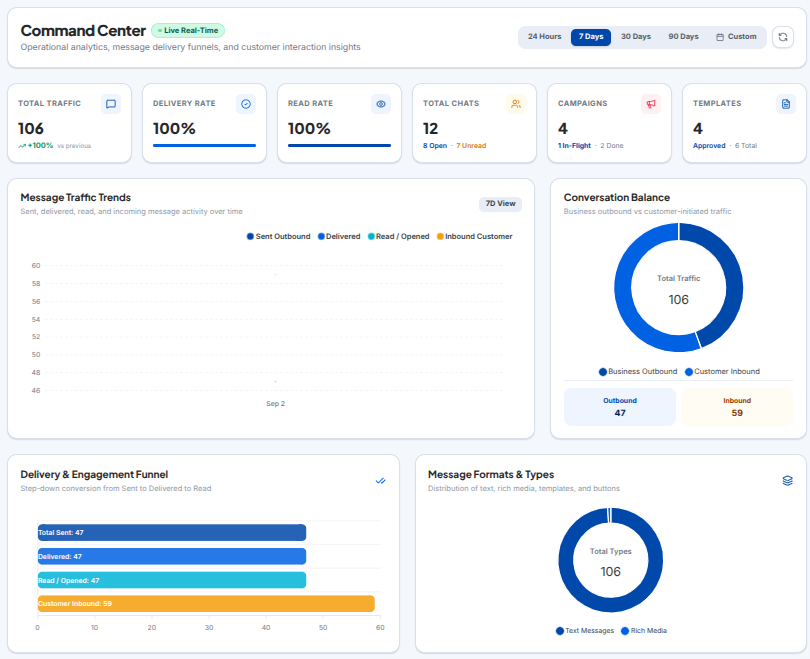
Real-time operational analytics, message traffic trends, and delivery conversion funnels
Official
WhatsApp Cloud API
Your own number and your own Meta Business account
No
per-message markup
Meta bills your messaging. We don’t take a cut
3 days
free trial
Everything unlocked, no card
Minutes
to first reply
Sign up, confirm your email, start answering
What your team gets
Built for the people who run sales and support on WhatsApp all day.
Assign chats to people
Hand a chat to the rep who should own it. Leave a private note to sort out pricing before you reply. When someone else takes over, the whole history is right there.
Control who sees what
Decide what each person can do. Keep an agent to their own chats, block contact exports, keep the confidential stuff confidential.
Broadcasts that stay safe
Send promotions and payment reminders as approved templates. The rate limiting is automatic, so the number keeps its quality rating instead of getting flagged.
Calls, with a transcript
Answer WhatsApp calls in the browser. Every one is recorded and transcribed, and it’s filed against the chat it came from.
Forms inside WhatsApp
Collect leads, booking dates and order details with a multi-screen form that opens in WhatsApp itself. People finish those far more often than a link to a website.
Meta Ads & Lead Pipeline
Capture Click-to-WhatsApp (CTWA) ads automatically. Manage deals on visual Kanban pipeline stages, schedule follow-ups, and launch retargeting broadcasts.
Two-way sync with your systems
An unknown number comes in and gets matched to a name or a roll number from your database, with a clean ID assigned automatically.
See the actual software before you sign up
Click through the five areas below and see how each one works.
Shared Team Inbox & Live Dispatch
Give your entire sales and support team access to one official WhatsApp number with clean chat assignments, internal notes, and zero message collisions.
Business Value: Built for sales managers and support leads who need multiple agents answering customers simultaneously without stepping on each other or losing lead history.
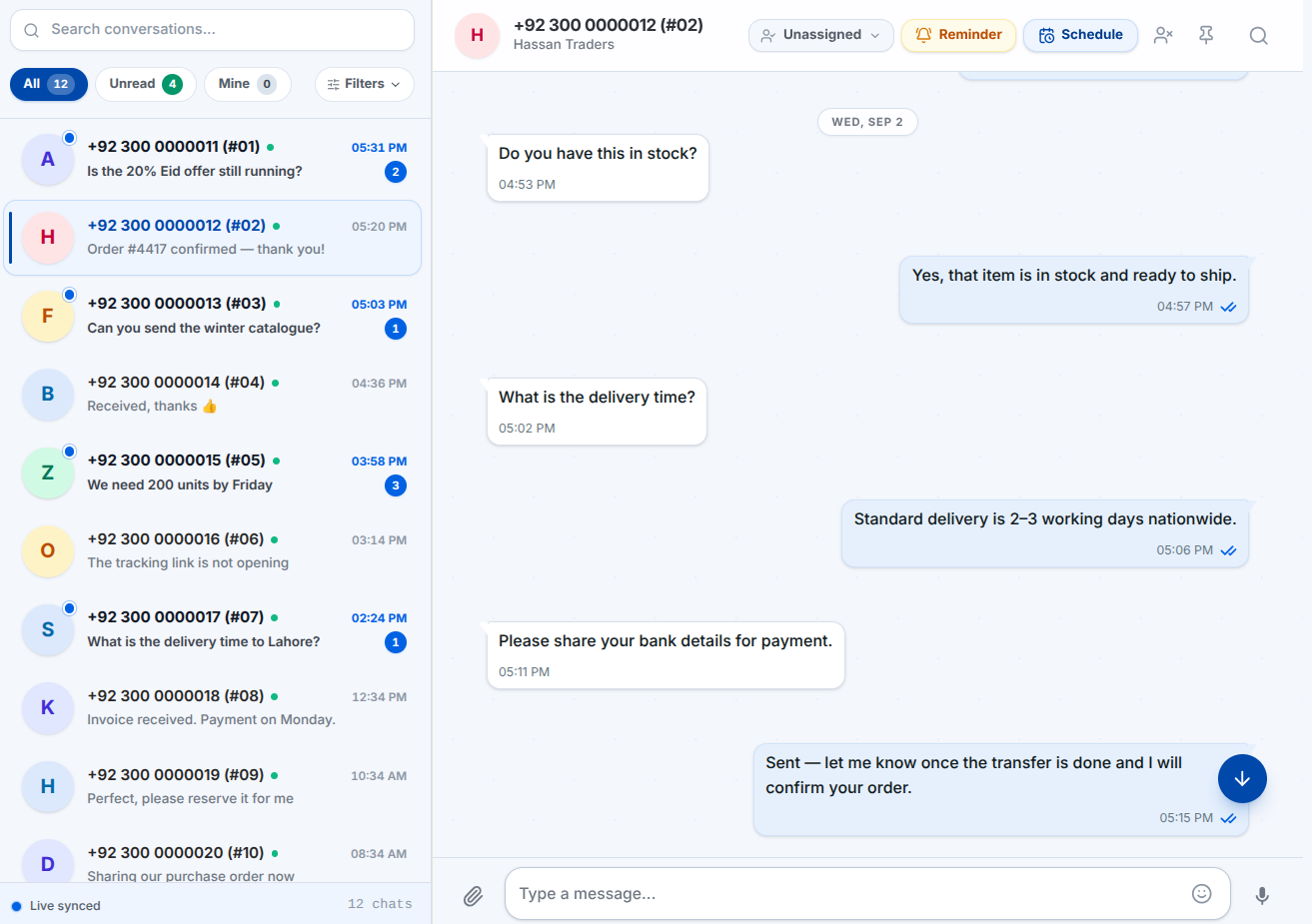
Multi-Agent Team Inbox
All incoming customer messages land in one shared dashboard, assigned cleanly to the right person.
Why this matters to your business:
Stops customers from receiving duplicate answers from different agents, and ensures no message sits unanswered.
The phone app vs RGS Solution
One phone doesn’t stretch to a growing team. Here’s what changes when you move to the official Cloud API.
One phone, one person at a time
If someone’s on leave, their chats are stuck on their handset. If they quit, the customer relationships leave with them.
How RGS Solution handles it
One inbox on the official Cloud API. Every chat, note and file stays with the company.
Bulk sends get numbers banned
Blasting messages from the normal app trips the spam filters, and the number gets blocked with no appeal.
How RGS Solution handles it
Approved templates, sent at a pace Meta is fine with, so the number keeps its quality rating.
Promises made on calls nobody recorded
When a customer says they were promised a discount or a date, there’s no recording to check, because handset calls aren’t recorded.
How RGS Solution handles it
Take the call in the browser. The recording and a searchable transcript get filed against the chat.
Feature by feature
| Requirement | Phone app | RGS Solution CRM |
|---|---|---|
| People on one number | One phone, one person | Your whole team, at once |
| Message history | Stuck in the handset | Searchable, exportable, kept |
| Broadcasts | Capped, risks a ban | Approved templates, paced sends |
| Handover | Told across the room | Assigned, labelled, with notes |
| Reporting | None | Delivery, read, reply and agent stats |
| Automation | An away message | Triggers, Flows and reminders |
| Calls | On the handset only | In the app, recorded, transcribed |
| Other systems | Copy and paste | REST API, webhooks, API keys |
Keep WhatsApp on your phone. Put your team on the CRM.
You don’t have to give up your phone. In Coexistence mode the owner keeps using the WhatsApp Business app while agents answer from the CRM on their desktops. It all syncs as it happens.
- The owner’s handset works exactly as before
- A message sent from the phone shows in the shared inbox right away
- Your existing chat history comes across during setup
- Nothing about how you already talk to customers has to change
Your Handset App
Stays with you
Shared CRM Desk
Multi-agent sync
Made for teams that sell on WhatsApp
Retail, distribution, clinics, real estate, e-commerce. It bends to how you already work.
Retail & e-commerce
Order confirmations, delivery updates, and a catalogue link the customer can reply to in the same thread.
Wholesale & distribution
The one number your dealers already message, with every order and price question in front of the whole desk.
Clinics & services
Appointment reminders that cut the no-shows, and an inbox where reception doesn’t lose a message.
Education & training
Admissions questions handled from one inbox, and broadcasts for intake dates and fee reminders.
Real estate
Listing enquiries go to the agent who owns them, and the next person sees the whole thread.
Support teams
Labels, assignment and reminders, so nothing sits there unanswered over a weekend.
Live in an afternoon
No servers, no IT project. Three steps and the team is online.
Start the trial
Put in your business name and email. Click the link we send and the workspace is live. No card, nothing to download.
Connect your number
If your Meta Business account is ready, linking it is about 2 to 3 steps. It’s your number and your account, and you can disconnect whenever.
Add your team
Invite your agents, decide who sees what, and start replying from one inbox. Bring in contacts and templates when you’re ready.
No Meta Business account yet? We’ll sort it.
If your Meta Business account isn’t created or isn’t verified, we handle the lot: set it up, get it verified with Meta, connect your number. One time, PKR 3,000. If your account is already set up, there’s no setup charge at all.
One monthly fee. Nothing hidden.
Meta bills the WhatsApp conversation charges straight to your account. We don’t take a commission on any of it.
Starter
One person answering their own WhatsApp
- Team members1
- Media storage5 GB
- Messages / day2,000
- Messages / month30,000
- Marketing sends / day500
- Campaigns / day3
Business
A team that has outgrown a single phone
- Team members10
- Media storage10 GB
- Messages / day10,000
- Messages / month150,000
- Marketing sends / day3,000
- Campaigns / day20
Premium
Everything: coexistence, calling, Flows and the API
- Team membersUnlimited
- Media storage15 GB
- Messages / day50,000
- Messages / month1,000,000
- Marketing sends / day20,000
- Campaigns / day100
The ones we get asked most
Connecting your number, team accounts, and how Meta’s billing works.
No, and we don’t take a cut of your messaging either. You pay us a flat monthly fee for the CRM. WhatsApp messaging is billed by Meta, straight to your own Meta account. That bill comes from them, not us.
You use your own official number and your own Meta Business account. If that account is already set up, linking it to the CRM is about 2 to 3 steps and a few minutes. You stay in control and can disconnect whenever you want.
We’ll do it. For a one-time PKR 3,000 we create the account, get it verified with Meta, and connect your number. You hand over the details and start using it. Nothing more to pay after that.
Yes, on Premium. Coexistence mode keeps the phone app working alongside the CRM, so a message you send from the handset still shows up in the shared inbox. It’s a Premium feature because it needs the newer WhatsApp onboarding path. Starter and Business connect the number straight to the CRM instead.
Coexistence mode lets you keep using the WhatsApp Business app on your physical mobile phone while linking the same number to the CRM shared inbox. It only requires your Facebook login and your active phone app—no complex Meta Business Manager setup or dedicated hardware required. Dedicated Cloud API mode connects a standalone number directly to Meta Cloud API without a phone app; it requires a clean, non-app number and an official Meta Business Account, but unlocks unlimited agents, enterprise throughput, interactive Flows, and automated multi-channel messaging.
Meta limits only apply to business-initiated marketing and utility template broadcasts outside the 24-hour window. New accounts start at Tier 0 (250 unique recipients per rolling 24 hours) and automatically scale to Tier 1 (1,000), Tier 2 (10,000), Tier 3 (100,000), and Tier 4 (Unlimited) as broadcast quality stays high. Incoming customer chats open a 24-hour service window with no message caps, and Meta provides 1,000 free service conversations each month. In Coexistence mode, manual replies sent directly from your mobile handset are always free and do not consume Cloud API tier limits.
Sending stops and the workspace goes read-only. Nothing is deleted right away. There’s a grace period where subscribing brings it all back exactly as it was, and we email you before and after, so it’s never a shock.
One flat fee a month, billed on the date you first subscribed. The invoice arrives before it’s due. Pay by bank transfer with a receipt upload, or by card where that’s switched on. Your billing page shows everything. Meta’s messaging charges are separate and go straight to your account. We don’t touch them.
Any time. Upgrade and it applies now, prorated for the days left in the period. Downgrade and it takes effect when the period you’ve paid for ends, so you don’t lose anything you paid for.
Yes. Your conversations, contacts and files belong to your workspace only. No other business on the platform can see them, and neither can we without your say-so. Export it all and delete the workspace whenever you like.
Give your team one inbox
3 days free, every feature on, no card. Connect your number today and see how it feels with the whole team on it.